About
For my own purposes, this is a quick and dirty guide on how to flash the BTT Manta M8P CAN and the EBB42 board with Klipper firmware using Katapult. This process should work for other BTT Manta M8P and EBB versions too, but you have to adjust the configuration accordingly.
USB or CAN Bus
The BTT Manta M8P CAN board can be flashed and used with Klipper firmware via two different methods: USB connection or CAN Bus. If you are using toolhead boards like the EBB36 or EBB42 that support CAN Bus, it is mandatory to use the CAN Bus method for communication between the mainboard and toolhead boards. If you are using toolhead boards that support USB connection (like the BTT SB2209 USB or the EBB36/42 v2.0), use USB connection instead.
In general, CAN Bus is the preferred method for communication between multiple boards in a 3D printer setup, as it provides better reliability and performance compared to USB connections.
Prerequisites
A working Klipper installation on a host system (Raspberry Pi, etc.). Follow the Klipper Installation Guide if you haven’t done this yet.
Basic knowledge of using the terminal/command line.
Installed
dfu-utilon your host system. You can install it via your package manager. For example, on Debian/Ubuntu-based systems, you can run:sudo apt-get install dfu-util python3-serialA USB cable to connect the BTT Manta M8P board to your host system for flashing Katapult and Klipper firmware.
A CAN Bus connection between the BTT Manta M8P board and the BTT EBB42 board for communication.
Configured CAN Bus on Host System
There a many ways to setup CAN Bus on your host system. I recommend to use systemd-networkd for this. Here is a quick example:
Add the following file /etc/systemd/network/80-can.link:
[Match]
Type=can

[Link]
TransmitQueueLength=128
and the following file /etc/systemd/network/80-can.network:
[Match]
Name=can0

[CAN]
BitRate=1000000
Run the following commands to load this configuration:
sudo systemctl daemon-reload
sudo systemctl restart systemd-networkd
My Artillery Sidewinder X2 Setup
- I replaced the original Artillery Mainboard with a BTT Manta M8P v1.1 board running in CAN Mode.
- I replaced the original Artillery Toolhead board with a BTT EBB42 v1.2 board running in CAN Mode.
Flashing the BTT Manta M8P v1.1 in CAN Mode with Katapult
Flash katapult to the BTT Manta M8P v1.1
This step is only necessary if you have a brand new BTT Manta M8P board without Katapult installed. If you already have Katapult installed, you can skip this step.
Download Katapult.
cd ~
git clone https://github.com/Arksine/katapult
cd katapult
Configure Katapult for the BTT Manta M8P v1.1 CAN:
make menuconfig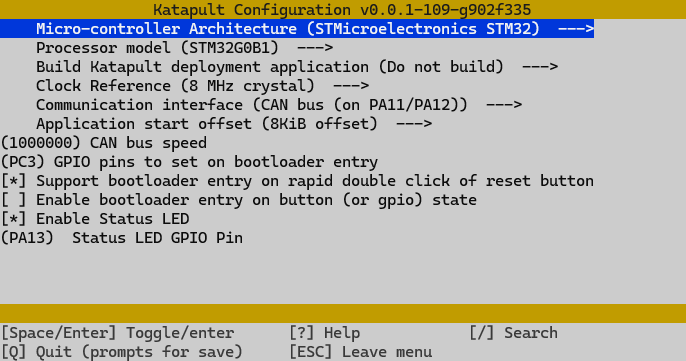
Be aware that I have also enabled the PC3 GPIO Pin. If you have connected a device like the BTT Relay V1.2 to the PS-ON GPIO Pin the power supply is switched via this pin.
Save and exit with
QuitandYes.Build the firmware-bootloader package:
make -jFlash Katapult
dfu-util -R -a 0 -s 0x08000000:mass-erase:force -D ~/katapult/out/katapult.binReset the board (or power off/on). Katapult should now be installed, the status LED will blink.
Flash Klipper to the BTT Manta M8P v1.1 in CAN Mode
Configure Klipper Firmware for the BTT Manta M8P v1.1 CAN:
cd ~
cd klipper
make menuconfig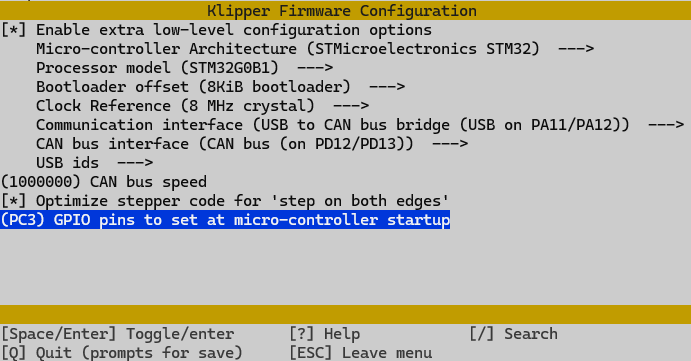
Be aware that I have also enabled the PC3 GPIO Pin. If you have connected a device like the BTT Relay V1.2 to the PS-ON GPIO Pin the power supply is switched via this pin.
Save and exit with
QuitandYes.Build the Klipper firmware:
make -jStop Klipper service first:
sudo service klipper stopFlash Klipper
Depending if Klipper is already running (update workflow) on the board, you need to switch into bootloader mode first. Run the following command to do so:
~/klippy-env/bin/python ~/katapult/scripts/flashtool.py -i can0 -u <CANBUS-UUID> -rReplace
<CANBUS-UUID>with the actual CANBUS-UUID of your board. (Configured inprinter.cfgunder[mcu]section ascanbus_uuid)Now the should get something similar to this:
Canbus Bridge detected at /sys/bus/usb/devices/1-1.4
Connecting to CAN UUID 4a0cb5640a86 on interface can0
Sending bootloader jump command...
Waiting for USB Reconnect...done
Detected new USB Device: 1d50:6177 katapult stm32g0b1xx
Katapult detected at serial port /dev/ttyACM0
Bootloader Request Complete
Your board is now in bootloader mode. You can connect to it via the serial port
/dev/ttyACM0.Finally, flash the Klipper firmware:
cd ~/klipper
make flash FLASH_DEVICE=/dev/ttyACM0
This should quit with an
CAN Flash Successmessage.
Restart Klipper to apply the changes.
sudo service klipper restart
Flashing the BTT EBB42 v1.2 in CAN Mode with Katapult
Flash katapult to the BTT EBB42 v1.2 CAN
This step is only necessary if you have a brand new BTT EBB42 board without Katapult installed. If you already have Katapult installed, you can skip this step.
Connect your EBB42 via USB and Flash Katapult.
- Power off your printer
- Unplug the CAN Bus cable from the EBB42 board to avoid any power issues.
- Temporarily bridge the 5V Jumper on the EBB42 board to power it via USB.
- Put the board into DFU mode by holding the BOOT button while plugging in the USB cable. Or as an alternative, press and hold the BOOT button, press reset, release reset, then release BOOT.
- The board should now be in DFU mode and ready to be flashed.
If needed, download Katapult.
cd ~
git clone https://github.com/Arksine/katapult
cd katapult
Configure Katapult for the BTT Manta M8P v1.1 CAN:
cd ~/katapult
make menuconfig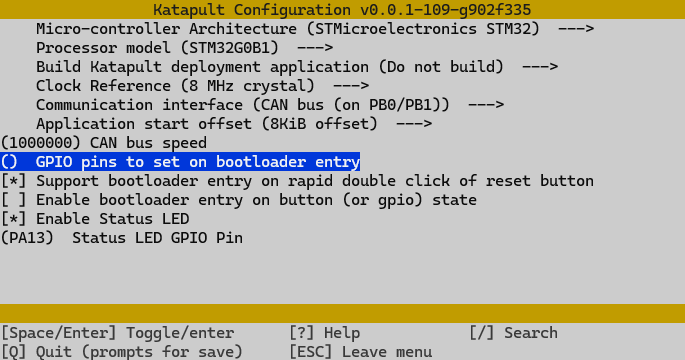
Save and exit with
QuitandYes.Build the firmware-bootloader package:
make -jFlash Katapult:
sudo dfu-util -R -a 0 -s 0x08000000:mass-erase:force -D ~/katapult/out/katapult.binThis should finish with a
File downloaded successfullymessage.Remove 5V Power Jumper, remove your usb cable and power off your printer. Add your CAN Bus cable to the EBB42 board, then power on. Katapult should now be installed.
Flash Klipper to the BTT EBB42 v1.2 CAN
Configure Klipper Firmware for the BTT EBB42 v1.2 CAN CAN:
cd ~
cd klipper
make menuconfig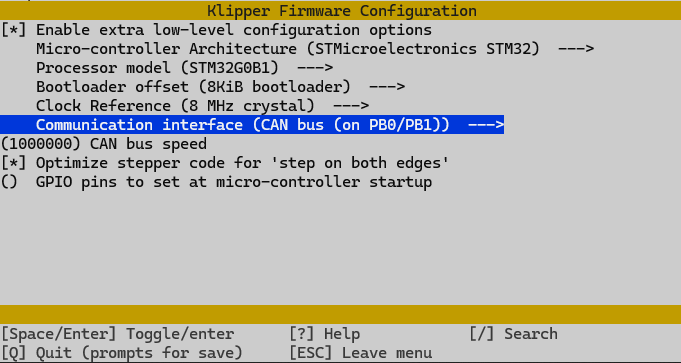
Save and exit with
QuitandYes.Build the Klipper firmware:
make -jStop Klipper service first:
sudo service klipper stopQuery the CAN Bus UUID of the EBB42 board:
~/klippy-env/bin/python ~/klipper/scripts/canbus_query.py can0You should get something like this:
Found canbus_uuid=c239709a91c7, Application: CanBootMake a note of the
CAN UUID, it should be the uuid of the your EBB42 board. Note it for the next step.Flash Klipper to EBB42
~/klippy-env/bin/python3 ~/katapult/scripts/flash_can.py -i can0 <CANBUS_UUID> -f ~/klipper/out/klipper.bin -uReplace
<CANBUS-UUID>with the actual CANBUS-UUID of your board. (Noted from the last step or configured inprinter.cfgunder[mcu ebb42]section ascanbus_uuid)This should result in something like this:
Verifying canbus connection
Flashing '/home/freaky/klipper/out/klipper.bin'...

[##################################################]

Write complete: 21 pages
Verifying (block count = 649)...

[##################################################]

Verification Complete: SHA = 0CD35886C377A91B5AB0E0AD44684CB24DEBE05E
Programming Complete
If you get any errors, and you double checked your CANBUS UUID, try to reset the EBB42 board by power cycling your printer and try again. If this not work, begin again from flashing Katapult to the EBB42 board.
Restart Klipper to apply the changes.
sudo service klipper restart
My Voron 2.4 Setup
- Mainboard: BTT Manta M8P v2.0 (USB Mode)
- Toolhead board: BTT EBB SB2209 v1.10 USB
Flashing the BTT EBB SB2209 USB
Configure Klipper Firmware for the BTT EBB SB2209 USB:
cd ~
cd klipper
make menuconfig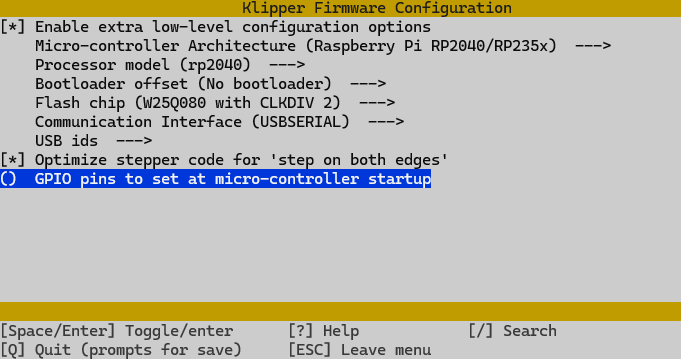
Save and exit with
QuitandYes.Build the Klipper firmware:
make -jStop Klipper service first:
sudo service klipper stopFlash Klipper
cd ~/klipper
make flash FLASH_DEVICE=2e8a:0003
This should result in something like this:
Flashing out/klipper.uf2 to 2e8a:0003
sudo lib/rp2040_flash/rp2040_flash out/klipper.uf2

Loaded UF2 image with 166 pages
Found rp2040 device on USB bus 1 address 9
Flashing...
Resetting interface
Locking
Exiting XIP mode
Erasing
Flashing
Rebooting device
Restart Klipper to apply the changes.
sudo service klipper restart
Flashing the BTT Manta M8P v2.0 in USB Mode
Configure Klipper Firmware for the BTT Manta M8P v2.0 USB:
cd ~
cd klipper
make menuconfig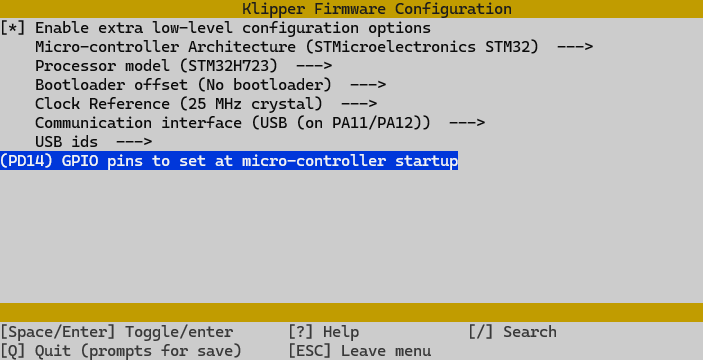
Be aware that I have also enabled the PD14 GPIO Pin. If you have connected a device like the BTT Relay V1.2 to the PS-ON GPIO Pin the power supply is switched via this pin.
Save and exit with
QuitandYes.Build the Klipper firmware:
make -jStop Klipper service first:
sudo service klipper stopFlash Klipper
If you doing that initially, you need to put the board into bootloader mode first. To do so, hold the BOOT button while plugging in the USB cable. Or as an alternative, press and hold the BOOT button, press reset, release reset, then release BOOT.
After that, you can flash the firmware:
sudo dfu-util -R -a 0 -s 0x08000000:mass-erase:force -D ~/klipper/out/klipper.binIf this results in an error you probably have Klipper already running on the board.
In this case, you can use the following command to flash the firmware. In your case the
xxxxxxxxxxxpart of the path may differ, so adjust it accordingly.Determine the correct serial path by listing the devices:
ls /dev/serial/by-id/usb-Klipper_stm32h723xx_*cd ~/klipper make flash FLASH_DEVICE=/dev/serial/by-id/usb-Klipper_stm32h723xx_xxxxxxxxxxx-if00This results in something like this:
Downloading element to address = 0x08000000, size = 41508
Erase           [=========================] 100%        41508 bytes
Erase    done.
Download        [=========================] 100%        41508 bytes
Download done.
File downloaded successfully
...
Ignore the errors below, you should be good to go.
Restart Klipper to apply the changes.
sudo service klipper restart
Further Links
- Klipper Documentation
- Klipper Git
- Katapult Git
- Dr. Klipper Wiki BTT Manta (CAN-Bridge)
- Dr. Klipper Wiki BTT EBB42 (CAN)
Support me
Please leave a comment if there is something wrong or missing, or if you have any questions. Have fun!
If you enjoyed this article and would like to support my work, feel free to buy me a coffee! Your support helps me continue creating content. Thank you! 